
If you’re looking for a simple way to build websites without writing complex code, understanding kompozer features can help you create and manage web pages quickly. KompoZer was designed as a beginner-friendly WYSIWYG (What You See Is What You Get) HTML editor, allowing users to visually design websites while the software automatically generates the code in the background.
Even though it’s an older tool, many beginners and hobbyists still appreciate it because of its simplicity, lightweight installation, and easy learning curve.
In this guide, you’ll discover the most important kompozer features, how they work, and why they made the program popular among first-time website builders.
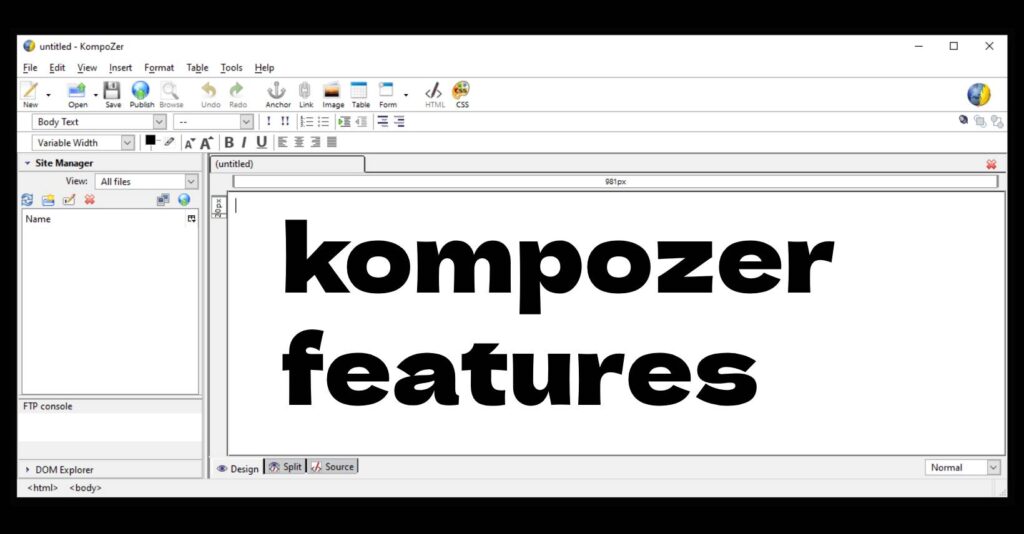
What Is KompoZer?
KompoZer is a free open-source web authoring tool that combines visual design with HTML editing. It was created as a continuation of the NVU editor and aimed to make website creation accessible to users without programming knowledge.
The main advantage is that you can design pages visually while still having access to the underlying HTML code when needed.
Main KompoZer Features
Below are the key kompozer features that helped users design websites faster and easier.
1. WYSIWYG Visual Website Editor
One of the most important kompozer features is the WYSIWYG editor.
This means:
- You design your webpage visually
- The editor automatically generates HTML code
- What you see in the editor is very close to the final result
This makes it ideal for beginners who want to build websites without learning HTML or CSS first.
2. Built-In HTML and CSS Editor
While KompoZer focuses on visual editing, it also includes a powerful code editor.
Users can:
- Edit raw HTML
- Modify CSS styles
- Switch between visual and code views
- Fix layout or formatting issues manually
This flexibility allows both beginners and intermediate users to work comfortably.
3. Site Manager for Organizing Projects
Another useful kompozer feature is the Site Manager.
It helps users manage multiple website files in one place. With the Site Manager you can:
- Organize pages and folders
- Manage website structure
- Upload files to your server
- Quickly access project assets
This makes working on larger websites easier.
4. Built-In FTP Publishing
KompoZer includes a built-in FTP client that lets you publish your website directly to a server.
Key benefits include:
- Upload pages without extra software
- Update your site instantly
- Manage remote files
This eliminates the need for separate FTP tools for beginners.
5. CSS Style Editor
Managing website styles becomes easier thanks to the CSS editor included in the kompozer features set.
You can:
- Create CSS rules visually
- Modify fonts, colors, spacing, and layout
- Apply styles to entire pages
This helps maintain consistent design across your website.
6. Tabbed Editing Interface
KompoZer supports editing multiple pages at once through tabs.
Benefits include:
- Switching between pages quickly
- Editing multiple files simultaneously
- Improving workflow for larger websites
This small feature significantly improves productivity.
7. Form Creation Tools
Another helpful kompozer feature is the form builder.
Users can easily add:
- Contact forms
- Input fields
- Checkboxes
- Buttons
- Text areas
All without writing HTML manually.
8. Table Editing and Layout Tools
KompoZer includes visual tools for creating tables and layouts.
You can:
- Insert tables quickly
- Adjust rows and columns
- Control spacing and borders
- Organize content visually
Before modern CSS layouts became standard, this was a common way to structure web pages.
Advantages of KompoZer Features
The main advantages of kompozer features include:
✔ Beginner-friendly interface
✔ No coding required for basic websites
✔ Built-in FTP publishing
✔ Visual CSS editing
✔ Lightweight and free software
Because of these features, KompoZer became a popular tool for hobbyists, students, and small website owners.
Limitations to Consider
Despite its useful features, KompoZer also has some limitations today:
- Development stopped years ago
- Limited support for modern HTML5 features
- Compatibility issues on newer systems
- Not ideal for modern responsive design
However, it can still be useful for learning basic web design concepts.
Final Thoughts on KompoZer Features
Understanding kompozer features helps explain why the editor was once one of the most popular tools for beginner web designers. Its combination of visual editing, code access, and built-in publishing made website creation accessible to people without programming experience.
While modern tools have replaced it in many workflows, KompoZer remains an interesting and educational option for those who want a simple way to experiment with HTML and website creation.